top of page


Early Concept Teaser Trailer
Platform:
Windows PC
Engine:
Unity Engine
Language:
C#
Tools Used:
Blender, Photoshop, Obsidian
Duration:
+1 Years
Completion:
In Development
Team Size:
4
Role:
Concept,prop and model placement,
enemy ai scripting, pathing,
event scripting, pacing,
dialog script, small voice-overs,
sound effect creation, UI/UX menu creation,
all gameplay scripting.
Overview:
Phantomware is an episodic psychological horror game where overtime shifts turn into something far more unsettling.
You’re working late, testing a mysterious game for a shady client, but as glitches appear and messages grow unsettling, you start to question what’s real.
The game’s eerie presence spreads beyond the screen, with the mysterious virus connecting the digital and physical worlds.
Cryptic clues and strange occurrences lead you deeper into a chilling mystery, where the boundary between reality and the game starts to collapse.
You soon start realizing that there might be no escape.
Key Features:
-> Photo-realistic visuals with an eerie atmosphere
-> VHS aesthetic for a retro horror feel
-> Text messaging receive and reply messages
-> Pixel OS a fully interactive mini operating system
-> Mini-games but not all are safe to play
Project Design Goals:
-
Create a fun level in UDK using only the default UDK assets (not including voiceover and music).
-
Demonstrate skills in combat encounter design, environment puzzle design, and level pacing.
-
Create an interesting game world and tell a compelling story based on the default UDK assets.
-
Make a level with a 3D isometric camera view to stand out from all of the first-person UDK levels.
Links:
SCREENSHOTS (FEEL FREE TO USE)


Detailed Info:
Phantomware 0 started with a simple idea: what if a normal night at the office slowly started getting weird? The project is built around that idea, with the player working late while strange messages, glitches, and events begin appearing around them. As the game progresses, the computer becomes more than just a prop and turns into an important part of the gameplay and story.
While working on the project, I focused on building the gameplay systems and making the different parts of the game work together. This included player interactions, the computer and UI systems, enemy AI, scripted events, dialogue, pacing, and various gameplay mechanics. A lot of the work also went into figuring out how to make the horror build slowly instead of throwing everything at the player at once.
The project is still in development, so Phantomware 0 is also an ongoing experiment in figuring out what works, testing ideas, and improving the game as development continues.
Game & Level Design:
Features I designed and worked on for Phantomware 0:
-
Horror concept and overall gameplay direction
-
Narrative design, dialogue, and story progression
-
First-person gameplay and exploration
-
Office environment layout and player movement flow
-
Level pacing and placement of scripted events
-
Environmental storytelling
-
Horror encounters and tension building
-
Gameplay interactions and interactive objects
-
Enemy encounter design
-
Enemy placement and behaviour
-
Computer-based gameplay and story interactions
-
Cutscenes and scripted sequences
-
Audio and visual cues used to build tension
-
Prop placement and environmental setup
-
Gameplay flow from the beginning of the shift through the later events
-
UI/UX design for the game's menus and interactive interfaces
Gameplay Programming (C#):
-
Player movement and first-person controls
-
Player interaction system
-
Interactive object system
-
Enemy AI
-
Enemy movement and pathfinding
-
Enemy behaviour and scripted actions
-
Event-based gameplay scripting
-
Trigger systems for scripted events
-
Gameplay state changes
-
Dialogue and message systems
-
Computer interaction systems
-
Mini-game and interactive computer features
-
Cutscene and camera scripting
-
Gameplay pacing and event sequencing
-
Audio and visual event triggers
-
General gameplay scripting and system integration
UI/UX & Interactive Systems:
-
Main menu and menu navigation
-
In-game UI
-
Computer interface
-
Interactive computer screens
-
Text messaging system
-
Message receive and reply interactions
-
Interaction prompts
-
UI flow between different computer applications
-
UI animations and transitions
-
Contextual UI elements
-
Menu interactions
-
UI integration with gameplay events
-
Designing the computer interface to feel like part of the game world rather than a separate menu
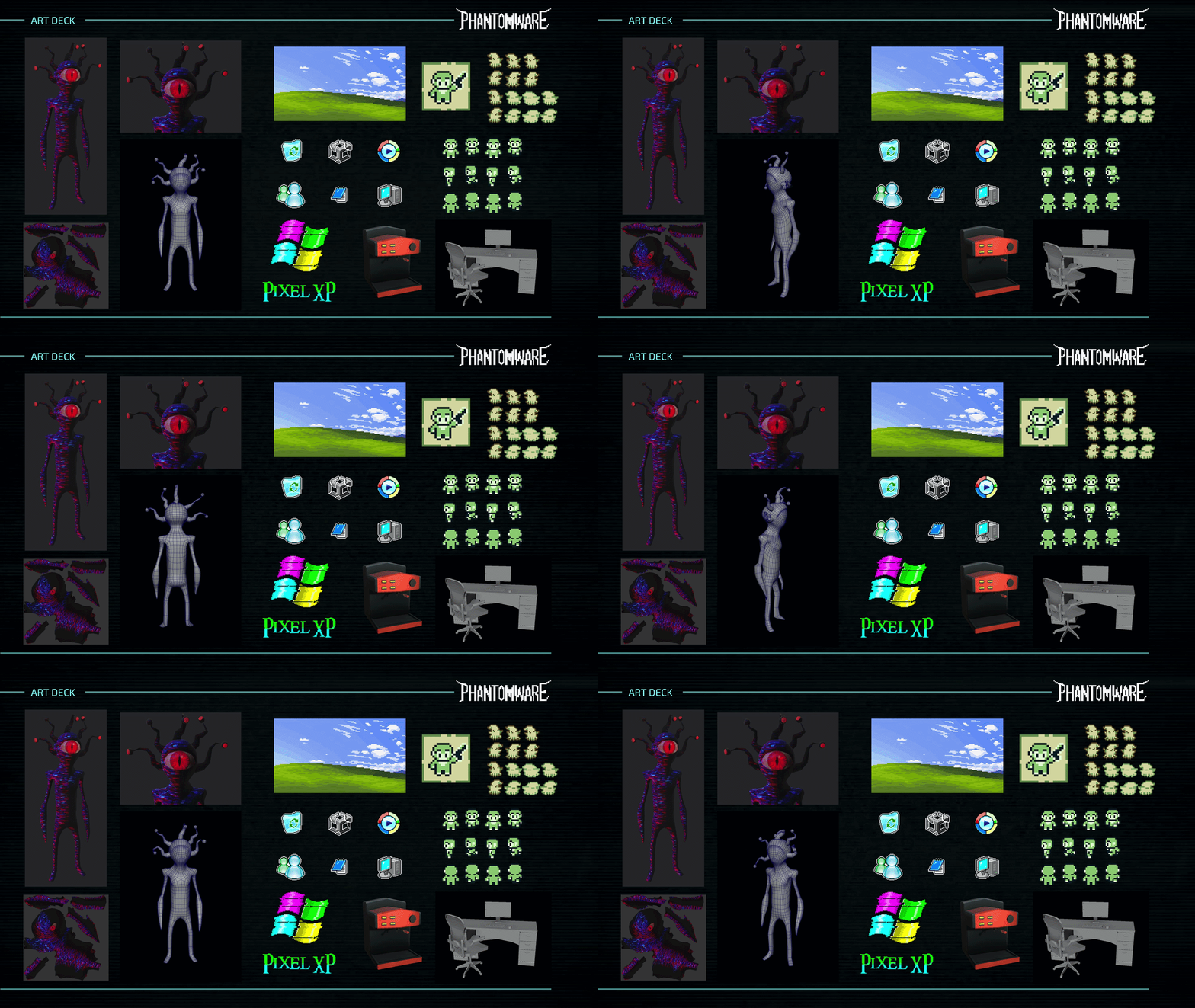
ART DECK
NEXT
bottom of page